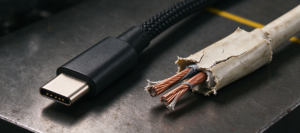

CarPlay is data, so a charging cable has nothing to say
CarPlay runs over a USB 2.0 link. That is 480 Mbps — the slowest USB data rate in common use, and completely sufficient, because the link carries control messages and a compressed display stream, not files. The phone decodes and renders; the head unit is a screen and a set of inputs.
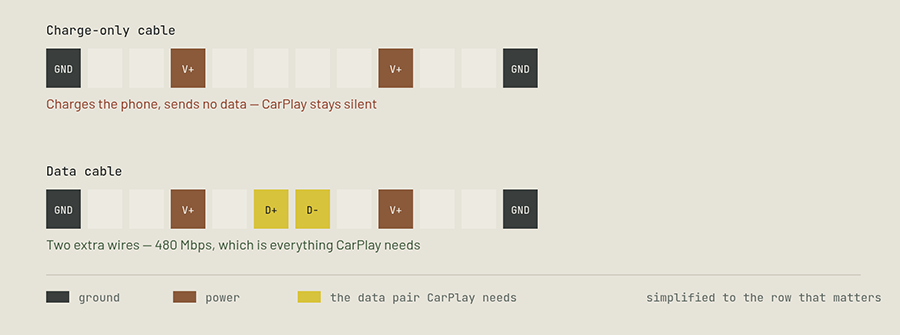
This is why the spec that matters is not “fast charging” or “10 Gbps”. It is whether the cable has data conductors at all. A USB-C cable needs a power pair, a ground and the configuration channel that tells the charger what to negotiate. A data cable adds the D+ and D− pair. Budget USB-A to USB-C cables are routinely built with only the charging set, because that is cheaper and most buyers never notice.
The five checks, in the order that actually saves time
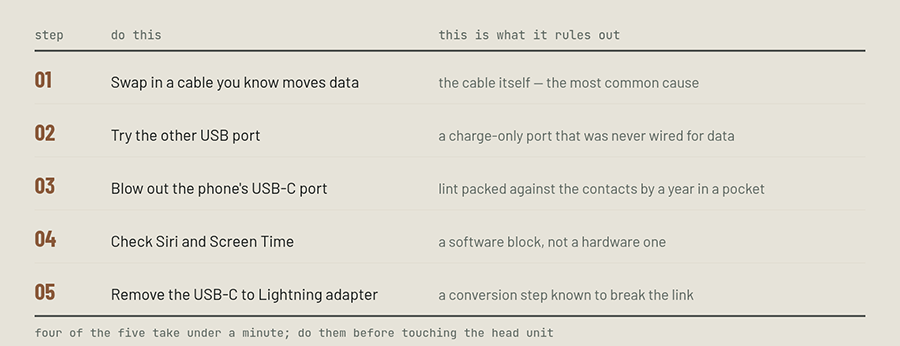
The order matters because the cheap checks are also the likely ones. A head unit reset, a firmware update or a network-settings wipe are real steps, but they come after you have ruled out the two-minute items, not before.
Two details are worth knowing. First, many cars expose several USB sockets and only one of them is wired to the head unit as a data host; the others are power outlets, often marked with a battery symbol rather than a phone. Second, the USB-C port on a phone collects lint with remarkable efficiency, and because the connector seats less deeply each month, the symptom looks like a bad cable rather than a blocked port.
| What you see | Most likely cause | What to do |
|---|---|---|
| Charges, never connects | Charge-only cable, or a charge-only port | Data cable first, then the other port. This pairing accounts for most cases. |
| Connects, drops every few minutes | Marginal contact — worn plug, lint, or vibration at the mount | Clean the port, reseat, and change the mounting angle so the plug is not loaded. |
| Worked yesterday, dead today | Cable flexed at the strain relief, or a software block | Wiggle the plug end while connected; if the screen flickers, it is the cable. |
| Only some cables work | Mixed inventory — charging leads and data leads in the same drawer | Mark the CarPlay cable physically and keep it in the car. |
| Not detected at all, other phone works | Port lint, or CarPlay restricted in Screen Time | Clean the port, check Siri, check Allowed Apps. |
| Wireless CarPlay drops instead | Wi-Fi/Bluetooth interference, not the cable | Different problem entirely — see the note below the table. |
The second problem: it charges, but not enough to navigate
Once the connection is stable, the next complaint is power. Navigation keeps the screen lit, the GPS running and the modem active for traffic — a real load that some car sockets cannot cover. The cable is not at fault here; the port is.
| Port in the car | Typical output | While navigating | What it means |
|---|---|---|---|
| USB-A, 1 Aolder cars, rear seats | 5 W | roughly break-even | Often falls slowly. You arrive with less battery than you left with. |
| USB-A, 2.1 Amost 2018+ head units | 10.5 W | holds or rises | Covers the drive. Fine for an hour, slow for a full charge. |
| USB-C PD, 20 W+newer vehicles | 20–30 W | charges while in use | The phone gains charge on a normal commute, not just holds it. |
| 12 V socket adapterthe plug-in kind | depends on the unit | varies | Check the amp rating on the body; many cheap ones share one output across two ports. |
If you need charging that keeps up, moving from a 1 A socket to a PD port or a proper 12 V adapter does more than any cable upgrade. A heavier-gauge cable trims a fraction of a watt at these currents; the port decides the whole budget.
What to spec if you are buying for a car
| Requirement | Why for a car | What to avoid |
|---|---|---|
| Data-capableUSB 2.0, 480 Mbps | CarPlay has no other way in. Everything else is secondary to this. | Listings that only mention “fast charging” and a wattage. |
| Right connector pairUSB-A→C or C→C | The phone is USB-C; the car may be either. Match the car’s data port. | Adapters stacked on adapters, especially USB-C to Lightning. |
| Short length0.5–1 m | Less slack to catch on the console, less cable to coil in the heat. | 2 m draped across the gear lever. |
| Right-angle plugdown or up, not out | Removes the sideways load at the connector in a mount. | A straight plug pressed against a holder or a lid. |
| TPE or good PVC jacket | Flexible when cold, resistant to taking a set when hot. | Stiff, glossy jackets that crease white when bent. |
| Gauge for 2.1 A at least | Keeps voltage drop low on a 5 V port, where every 0.1 V is 2%. | 28 AWG charging leads on a long run. |
Questions we get from buyers
- Does a faster cable make CarPlay more stable?
- No. CarPlay is a 480 Mbps USB 2.0 link. Stability comes from having the data pair at all, a clean port and a plug that is not being pulled sideways. Speed above 480 Mbps is unused.
- Why did my old cable work with my last iPhone but not the new one?
- Because the connector changed. A Lightning cable with a USB-C adapter now sits in a chain that Apple itself warns can disrupt wired CarPlay; a USB-A to USB-C charging lead has no data pair at all. Both cables “work” for power and neither carries the handshake.
- Is the USB port in my car charge-only?
- Often. Many vehicles have one data port for the head unit and several power-only sockets elsewhere. Look for the phone or CarPlay symbol; a battery symbol means power only.
- Can a cable fix CarPlay that drops only in hot weather?
- Partly. Heat softens the jacket and can shift contact pressure, so a TPE jacket and a right-angle plug help. Keeping the phone out of direct sun and off the dash helps more, and it is free.
- Do I need a special CarPlay cable?
- You need a data-capable cable with the right connector pair. “CarPlay cable” is a marketing label, not a standard — the requirement is the USB 2.0 data pair, and any honest data cable meets it.